.png)


Mastering Site Architecture SEO in Webflow
Site architecture is how you organize your website's content. Think of it less like a task and more like a strategy—a way to help both users and search engines find what they're looking for without getting lost. It's essentially the blueprint for your website, showing how every page is structured, linked, and connected. For anyone running their site on Webflow, getting this right is the bedrock of any serious organic growth plan.
Why Site Architecture Is Your SEO Foundation
Imagine your website is a massive library. If books (your pages) are just tossed into random piles, anyone looking for information will get frustrated and walk out. Search engine crawlers—the digital librarians—will have an equally hard time figuring out what your library is all about. A solid site architecture creates that logical shelving system, turning your website into a reliable resource for everyone.
This structure really does three things at once. It creates a smooth, intuitive path for your visitors. It hands search engine crawlers a clear map to follow so they can find and index all your content. And finally, it builds real topical authority by grouping related content together in a way that just makes sense.
The Impact on User Experience
A logical site structure has a direct and immediate impact on user experience. When people can find what they need quickly, they stick around longer, explore more of your content, and are much more likely to become customers. This is especially true for ambitious companies using Webflow; a confusing website is a massive roadblock to generating qualified leads.
One of the golden rules here is to keep your hierarchy shallow. Users should be able to get to any important page within just three clicks.
Your site's structure is a silent conversation with your user. A clear, intuitive architecture says, "I understand what you need, and I've made it easy to find." A confusing one screams, "Figure it out yourself," sending potential customers straight to your competitors.
Guiding Search Engine Crawlers
Beyond just making users happy, your site's architecture is how you talk to search engines like Google. Crawlers discover your content by following links. A clean, hierarchical structure with smart internal linking helps them understand the relationships between your pages and pinpoint which ones are the most important. This whole process is called crawlability, and it's the absolute first step to getting your pages to rank.
This isn't just a nice-to-have, especially for growth-stage B2B SaaS teams that are constantly publishing new content. Picture this: one large website completely revamped its structure and saw organic traffic jump by 175% in just a few months. That's the power of applying these principles. You can find more details about these kinds of SEO strategies on Market My Market.
By making sure new blog posts and product pages are logically linked from core hub pages, you speed up how quickly they get discovered and indexed. A thoughtful architecture turns your Webflow site from an online brochure into a machine that drives real revenue.
The Core Principles of a Winning Site Structure
A winning site structure isn't some abstract marketing concept; it’s the blueprint for how search engines and users navigate your website. Think of it like a well-organized library. Your homepage is the main entrance, leading to clearly marked aisles (categories), which in turn lead to specific shelves (subcategories) and individual books (your pages).
The best sites keep their most important content just a few steps from the entrance. This intuitive design is the very foundation of site architecture SEO, and it has a direct, measurable impact on how both people and Google understand what your site is all about.
At its core, a solid architecture comes down to three things: a clear hierarchy, clean URLs, and smart internal linking. When you get these right, you create a seamless experience that guides visitors where they need to go and signals your expertise to search engines. This is how you turn a plan into a high-performing Webflow site.
This diagram breaks it down visually, showing how a strong foundation supports everything else.
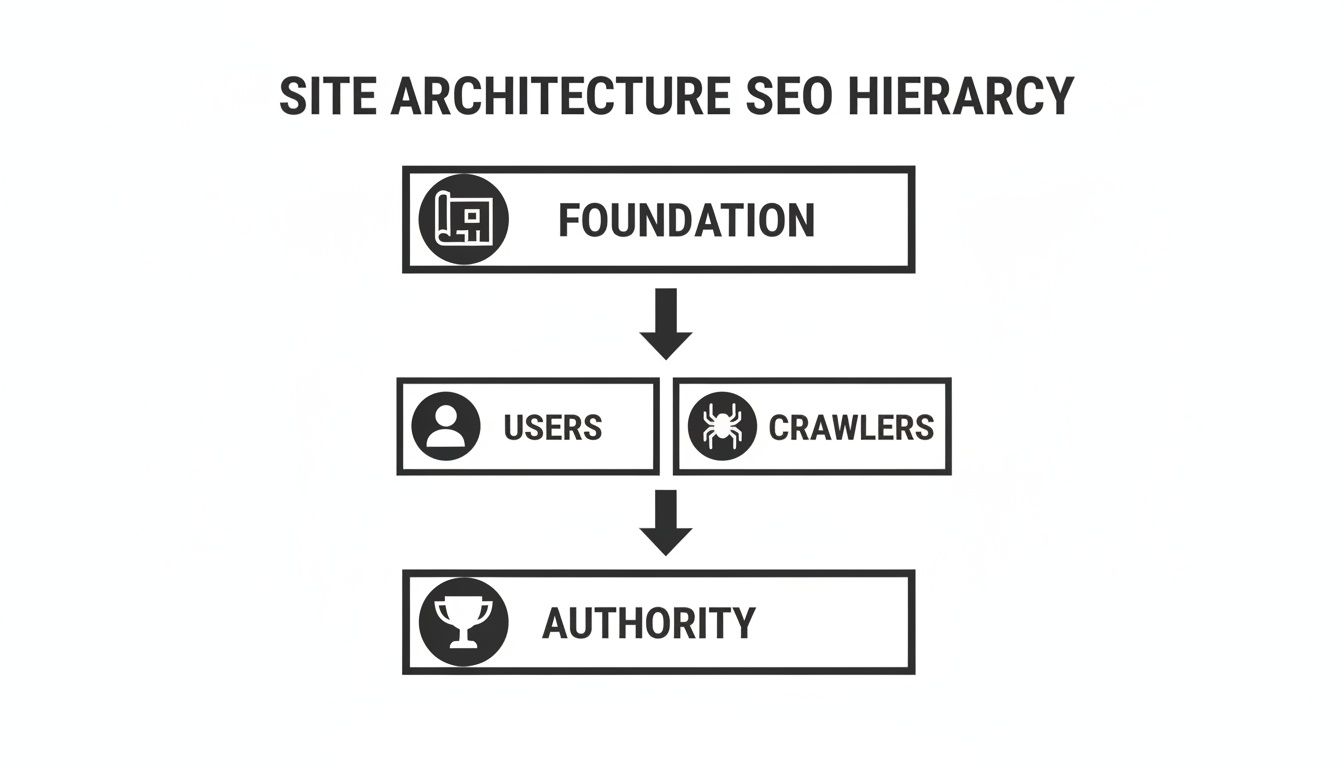
As you can see, the blueprint has to work for both humans and crawlers. Nail that, and you're on your way to building real authority.
A Logical Content Hierarchy
First things first: you need a logical hierarchy. Your site's content should flow naturally from broad, high-level topics down into more specific, granular details.
The golden rule here is to keep your most valuable pages no more than three clicks from your homepage. This creates what we call a "shallow" site depth, which is fantastic for both user experience and getting your pages crawled efficiently.
For a typical Webflow site, that might look like this:
- Click 1 (Homepage): The front door of your site.
- Click 2 (Category Page): A major section, like
/services/seo-strategy. - Click 3 (Sub-Category or Post): A specific service or article, like
/services/seo-strategy/technical-audits.
This structure is predictable. Users get it instantly, which means they stick around longer and bounce less—both signals that Google pays close attention to.
Clean and Descriptive URLs
Your URLs are a surprisingly powerful, and often neglected, piece of your site's architecture. Every URL should be clean, human-readable, and descriptive. It’s your first chance to give users and search engines a clue about what the page contains.
This is a classic example of a poorly structured URL:yourwebsite.com/page-id-882?category=4
An SEO-friendly URL, on the other hand, tells a story:yourwebsite.com/blog/webflow-tips/improve-site-speed
See the difference? The second one mirrors the site's hierarchy and reinforces the page's topic. It’s also much easier to share. In Webflow, you can set this up perfectly by organizing your CMS Collections into logical folders, ensuring your URLs are as clean as your content.
A well-crafted URL is like a signpost on a highway. It tells you where you are, where you're going, and what to expect when you get there. Messy URLs are like broken signs—they just cause confusion and frustration.
Strategic Internal Linking
Finally, internal linking is the glue that holds your entire site architecture together. These are the contextual links that connect your pages, creating pathways that guide users and crawlers from one piece of content to the next.
Every time you link one of your pages to another, you’re telling Google, "Hey, this other page is important and related." A smart internal linking plan achieves several critical goals:
- Passes Authority: It funnels "link equity" from powerful pages (like your homepage) down to deeper, more specific pages.
- Creates Topic Clusters: It groups related content together, proving to search engines that you have deep expertise on a subject.
- Boosts Crawlability: It helps Googlebots discover and index your new content much faster.
If you’re ready for a deep dive, we’ve created a complete framework in our guide to building a powerful internal linking strategy. And for those looking to scale content creation in a structured way, exploring programmatic SEO strategies can be a game-changer. By mastering these core principles, you can turn your Webflow site's structure into your most powerful tool for organic growth.
How to Build Your SEO Blueprint in Webflow
This is where the rubber meets the road. All the theory about site architecture is great, but putting it into practice inside a Webflow site is what actually gets you results. This isn't just about organizing pages; it's about building a blueprint that’s intuitive for both your users and for search engine crawlers. Let's walk through how to execute this in the Webflow Designer.
Getting your content hierarchy right from the beginning is a game-changer, especially for companies publishing a steady stream of content. It ensures that every new blog post, case study, or landing page slots perfectly into a logical system that supports your SEO goals, preventing a massive cleanup project down the line.
Structuring Content With CMS Folders
First things first: use folders to organize your CMS Collections. Think of these folders like the main aisles in a grocery store—they immediately tell visitors (and Google) what kind of content they're about to find. This is the bedrock of good site architecture SEO in Webflow.
Instead of letting every blog post or case study live at the root level of your domain, you need to group them logically.
- Go to the Pages Panel on the left side of the Webflow Designer.
- Click the "Create New Folder" icon at the top right of the panel.
- Name your folder (e.g.,
blog,services,case-studies). - Drag your existing static pages or your CMS Collection pages into this new folder. Now, all URLs for items in that collection will automatically inherit the folder path (e.g.,
yourdomain.com/blog/post-name).
This structure provides instant context. It signals to Google that every page inside the /blog/ folder is related, which helps you build topical authority and makes your entire content ecosystem stronger.
Using folders is the foundational step toward building a clean, logical site hierarchy that can scale effortlessly as you add more and more content.
Configuring Clean URL Slugs
Once your folders are set up, it's time to fine-tune the URL slugs for your pages and CMS items. The slug is just the final part of the URL after the last slash, and it needs to be short, descriptive, and focused on your target keyword.
- For a CMS item: Open your Collection and click on an item. Find the default "Slug" field. Webflow auto-generates this from your "Name" field, but you should always edit it for SEO.
- For a static page: Go to the Pages Panel, hover over the page, and click the Settings (cog) icon. The "Slug" field is right there.
- Edit the slug to be concise and keyword-focused. For example, change
10-essential-tips-to-speed-up-your-websitetospeed-up-website.
A URL is more than just an address; it's a piece of user experience. A clean, readable URL builds trust and provides context before the user even clicks. A long, messy URL just creates uncertainty.
When crafting your slugs, stick to these simple rules:
- Keep them short and sweet: Ditch unnecessary words like "a," "the," and "in."
- Include the primary keyword: The slug should clearly reflect the page's core topic.
- Use hyphens to separate words: This is the standard, most readable format for users and search engines.
Building Scalable Internal Links With Reference Fields
Internal links are the threads that weave your site architecture together. You could add links manually in a Rich Text field, but for a truly scalable system, Webflow’s Reference Fields are the way to go. This feature lets you create powerful, direct connections between items in different CMS Collections.
- Go to your "Blog Posts" Collection settings.
- Click "Add New Field" and select "Reference".
- In the field settings, select the Collection you want to link to (e.g., "Services"). Give the field a helpful name like "Related Service."
- Now, when you create or edit a blog post, you'll see a new dropdown menu where you can simply select the specific service that post relates to. You can then pull this linked data onto your Blog Post Template page to automatically display a link to the relevant service.
This creates strong, contextual internal links that are a breeze to manage across your entire site. For B2B tech companies, this kind of strategic architecture is a massive advantage. It supercharges crawlability, helping search engines find and index your new content faster, which in turn helps those pages rank sooner. Combine this with a consistent content engine and every article you publish gets discovered quickly. This reflects findings that show well-structured sites can earn up to 25% more clicks from rich results.
By building this framework in Webflow, you're not just organizing content. You're engineering a predictable system for attracting the right kind of traffic. To dive deeper, you can discover more insights about site architecture best practices on babylovegrowth.ai.
Managing Crawlability and Indexing in Webflow
Once you've laid out the architectural blueprint for your site, it’s time to hand it over to the construction crew—the search engine crawlers. Guiding how these bots navigate and understand your Webflow site is a massive part of site architecture SEO. This is where you take the reins, deciding which pages get the spotlight and which stay backstage.
It’s all about giving Google clear, direct instructions. By mastering a few technical controls inside Webflow, you can push your most valuable content to the front of the line for indexing and sidestep common issues that water down your SEO authority.
Submitting Your XML Sitemap
Think of your XML sitemap as the official table of contents you hand to search engines. It’s a simple file that lists every important page you want them to find and crawl. The good news? Webflow handles all the heavy lifting by automatically creating and updating this file for you.
Your only job is to tell Google where to find it. Here’s how:
- Find your sitemap: In your Webflow project, navigate to Project Settings > SEO.
- Toggle on Auto-generate sitemap: If it isn't already, ensure this is enabled.
- Copy the URL: It will be
yourdomain.com/sitemap.xml. - Submit to Google Search Console: Log into your GSC property, go to the "Sitemaps" report in the left menu, paste the URL, and click "Submit."
That’s it. This one action tells Google, "Hey, here’s a complete list of my pages. Please come take a look." It’s a foundational step that ensures crawlers don't miss any of your content, especially pages you’ve just published. You can dive deeper into this process in our guide on what website indexing is.
Using Canonical Tags to Avoid Duplication
Duplicate content is a silent killer for SEO. It creeps in when the same (or nearly identical) content shows up on multiple URLs, which confuses search engines and splits your ranking power between different pages.
This is exactly what canonical tags were made for. A canonical tag (rel="canonical") is just a small snippet of code that points search engines to the one "master copy" of a page. It effectively merges all the ranking signals into a single, preferred URL.
- Go to the Pages Panel and open the Settings for the page you want to add a canonical tag to.
- Scroll down to the Custom Code section.
- In the Inside tag field, paste your canonical link tag. For example:
<link rel="canonical" href="https://www.yourdomain.com/master-page-url" /> - Replace the URL with the one you want Google to prioritize. Save and publish.
A canonical tag is like telling a librarian, "You found this book in three different aisles, but this one is the original. Please direct everyone here."
This is crucial for pages with URL parameters (like from marketing campaigns or filters) or if you syndicate your content on other websites.
When to Use Nofollow and Noindex
Let’s be honest: not every page on your website belongs in the search results. Things like internal dashboards, thank-you pages, or staging sites should be kept private. For that, nofollow and noindex directives are your best friends.
- Webflow Tutorial: Go to Page Settings > SEO for the specific page. Scroll to the "Indexing" section and toggle on "Exclude this page from site search results". This adds the
noindextag for you.
- Webflow Tutorial: When adding a link to text or an element, click the link settings icon. There you'll find a checkbox for "Open in a new tab" and a gear icon for advanced options. Click the gear icon and check the box for "Set to nofollow". This is perfect for user-generated comments or links to sites you don’t fully trust.
Using these tools strategically helps you protect your crawl budget—the finite amount of time and resources Google dedicates to crawling your site. By blocking off the unimportant pages, you ensure crawlers spend their valuable time on the content that actually matters to your business.
Auditing and Measuring Your Site Architecture
You can't improve what you don't measure. A solid site architecture isn't a "set it and forget it" task—it demands regular check-ups to make sure everything is running as it should. Auditing your site’s structure is how you find those hidden problems before they start dragging down your SEO and frustrating your users.
Think of this process as looking at your site through the eyes of a search engine. You'll spot the broken pathways, find important content that’s buried too deep, and confirm that every single page has a clear role in your site's hierarchy. For anyone running a Webflow site, this is the bridge that connects technical SEO health to real business outcomes like traffic and conversions.
Key Tools for Your Architectural Audit
To get a proper diagnosis of your site architecture's health, you need the right tools. These aren't just fancy gadgets; they give you the hard data to move from pure guesswork to a clear, actionable plan. They’re like an X-ray machine for your website's skeleton.
- Google Search Console (GSC): This is your direct line to Google. The Pages report is gold, showing you which URLs are indexed and, just as importantly, which ones are being ignored due to errors like redirects or crawl anomalies.
- Screaming Frog SEO Spider: A beast of a desktop crawler that maps out your site exactly how a search engine sees it. It’s absolutely essential for visualizing your structure, checking click depth, and finding broken internal links at scale.
- Ahrefs or Semrush: These all-in-one SEO platforms have powerful site audit features that flag architectural problems, from pesky redirect chains to orphan pages, and let you track your progress over time.
These tools are meant to be used together. GSC tells you what Google is actually seeing, while a crawler like Screaming Frog shows you the underlying structure that’s causing those results in the first place.
A Prioritized Audit Checklist for Webflow Sites
Staring down a full site audit can feel like a massive job. The secret is to focus on the fixes that deliver the biggest bang for your buck. Use this checklist to prioritize your work and knock out the most common architectural issues first.
- Check for High Click Depth: Fire up Screaming Frog, run a crawl, and sort by "Crawl Depth." Are any of your core service or product pages more than 3 clicks from the homepage? If they are, they’re probably leaking authority and are much harder for both users and crawlers to find.
- Hunt for Broken Internal Links (404s): In that same Screaming Frog crawl, check the "Response Codes" report for "Client Error (4xx)" statuses. These broken links are dead ends for your visitors and a complete waste of your crawl budget. Jump into the Webflow editor, find these broken links, and update them.
- Identify and Fix Redirect Chains: A redirect chain (where Page A redirects to Page B, which then redirects to Page C) slows down crawlers and dilutes your precious link equity. Your audit tool will flag these. In Webflow, fix this by going to Project Settings > Publishing > 301 Redirects and changing the original redirect to point directly to the final Page C.
A healthy site architecture is dynamic, not static. Regular audits are like routine maintenance on a high-performance engine; they keep everything running smoothly and prevent small issues from becoming major breakdowns.
While you’re at it, don’t forget about your external links. Regularly checking for broken backlinks is a critical part of any audit, as it helps preserve link equity and ensures a good user experience. You can use tools like the Ahrefs Broken Backlink Checker to help with this.
Connecting Metrics to Business Goals
The final, and most important, step is to connect these technical fixes to real business impact. Fixing a broken link isn't just a nerdy SEO task; it's about clearing the path for a potential customer to reach a page where they can convert.
Keep an eye on these Key Performance Indicators (KPIs) to prove your work is paying off:
- Increase in Indexed Pages: As you clean up crawl errors, you should see more of your important pages showing up as indexed in Google Search Console.
- Improved Organic Rankings for Key Pages: By funneling more internal link authority to your money pages, their rankings should start to climb.
- Lower Bounce Rate: When your site is easier to navigate, users find what they need faster. That means less frustration and fewer people bouncing right back to the search results.
By connecting these dots, you can clearly show how a clean site architecture SEO strategy translates directly into more traffic, better rankings, and ultimately, more leads.
Your Roadmap to a High-Performing Webflow Site
So, where do you go from here? We've covered a lot of ground, but it all boils down to a clear, strategic roadmap. A Webflow site that performs well in search doesn't get there by accident; it's engineered with a deliberate plan that keeps both users and search engines happy.
The entire process really hinges on a few core truths we've explored.
First, a logical hierarchy is non-negotiable. It's the essential bridge between a good user experience and efficient search engine crawling. Second, your internal linking strategy is the most powerful tool you have for spreading authority across your site and showing Google you're an expert on a topic. And finally, getting a handle on Webflow’s specific features—like CMS folders and reference fields—is what makes all this theory actually work in practice.
Phasing Your Architectural Improvements
Fixing your site architecture SEO isn't a weekend project you can just check off the list. Think of it as a continuous process that runs right alongside your regular content and marketing work. If you try to fix everything at once, you'll likely get overwhelmed and end up doing nothing.
A much smarter way to tackle this is with a phased approach that creates steady, compounding wins over time. Here’s a high-level plan that works well for growth-stage teams:
- Phase 1 (Months 1-2): Foundational Fixes: Start with the quick wins—the tasks that give you the biggest bang for your buck. Kick things off with an audit to find and fix all your broken internal links. After that, make sure your XML sitemap is properly set up and submitted in Webflow. Finally, establish a clean, simple URL structure for any new content you create from this point forward.
- Phase 2 (Months 3-6): Content Hierarchy & Linking: Now it's time to get your content organized. Group related blog posts, case studies, or services into logical CMS folders. This is also when you'll start building out your topic clusters, strategically linking your supporting articles back to your main pillar pages.
- Phase 3 (Ongoing): Continuous Optimization: This is where great site architecture becomes a habit. Make it a part of your regular workflow. Before you hit "publish" on a new post, double-check that it links back to a pillar page. Run a mini-audit every quarter to find any orphan pages and ensure your most important content is still easy for crawlers to find.
From Cost Center to Revenue Engine
Following this roadmap changes how you think about your website. Site architecture stops being a one-off technical chore and becomes an active, ongoing strategy that drives real growth. Every little improvement, from cleaning up a messy URL to adding a single contextual internal link, is a step toward building a more predictable and powerful revenue engine.
A well-structured Webflow site doesn’t just attract traffic; it guides that traffic with purpose. It transforms your online presence from a simple marketing expense into your most reliable asset for generating qualified leads and driving business growth.
Got Questions? We've Got Answers
If you're still wrestling with some of the finer points of site architecture for SEO, you're not alone. Let's tackle some of the most common questions we hear from teams working with Webflow.
How Often Should I Actually Audit My Site Architecture?
Think of it like a check-up. For most growing businesses, a deep dive into your site architecture once a year is a solid plan. You should also pencil one in before any major site redesign, a new product launch, or a big pivot in your content strategy.
That said, don't wait a full year to spot trouble. Get into the habit of doing monthly health checks in Google Search Console. This lets you catch new crawl errors or indexing problems before they snowball.
What's the Ideal "Click Depth" for My Important Pages?
Here’s a golden rule: your most valuable pages should be no more than three clicks from your homepage. This includes your core service pages, key product features, and your main contact page.
A shallow structure is a massive signal to both users and search engines. It tells them, "This content is important," making it easier for crawlers to find, index, and assign authority to your most critical pages.
Keeping these pages close to the homepage ensures they get the attention they deserve from Google.
Can I Fix My Site Architecture Without a Total Redesign?
You absolutely can. In fact, some of the highest-impact changes don't require blowing up your whole site.
Things like tightening up your internal linking strategy, cleaning up messy URLs in Webflow, or fixing broken links can deliver surprisingly big SEO wins. Even adding breadcrumbs can make a real difference. A phased, iterative approach is almost always smarter and more sustainable than a massive, one-and-done project.
Does My Webflow CMS Folder Structure Really Matter for SEO?
Yes, it matters a great deal. How you organize your Webflow CMS Collections directly translates into your URL structure. Creating a logical hierarchy, like /blog/topic/post-name, is one of the clearest ways to communicate your site's structure.
This approach helps search engines see how your content is related, which is fantastic for building topical authority. Just as important, it gives your human visitors a much more intuitive path to follow—and that combination is a recipe for better rankings.
Ready to turn your Webflow site from a digital brochure into a reliable growth engine? The team at Block Studio blends expert Webflow development with proven SEO and content strategies to drive real, compounding results. Learn how we build high-performing websites that attract and convert qualified leads.