.png)

What Is Search Intent A Guide for High-Performing Webflow Sites
At its core, search intent is the "why" behind every single Google search. It’s the specific goal a person has in mind when they type something into that little white box—whether they’re trying to learn something new, find a particular website, or are ready to pull out their credit card.
Understanding the Why Behind Every Google Search

Think of your Webflow site as a physical storefront. Some people wander in just to browse, others are actively comparing prices between your shop and the one next door, and a few are marching straight to the counter, ready to buy. You wouldn't treat them all the same, would you? Search intent is that exact same principle applied to your website traffic. It’s all about meeting each visitor where they are.
Google has gotten incredibly sophisticated at this. It's moved way beyond simple keyword matching to decipher what people actually want to accomplish. This means that if you're still just chasing keywords, you're missing the point. Creating content without understanding the user's goal is like building an elaborate product page when all your audience really wants is a straightforward "how-to" guide.
The Foundation of Modern SEO
Search intent—sometimes called user intent or query intent—is truly the bedrock of modern SEO. By understanding what a user is trying to do, you can align your content to give them exactly what they need. And when you do that, Google rewards you with higher rankings. It’s a simple, powerful feedback loop.
For anyone running a Webflow site, this concept is a complete game-changer. It shifts your SEO efforts from a technical to-do list to a strategy focused squarely on the user, which is what drives real business results. To get a handle on what your audience is really after, digging into some of the top audience research methods is a fantastic starting point for uncovering those deeper needs and intentions.
By decoding the purpose behind a search query, you can create content that not only ranks but also resonates, guides, and converts. It's the difference between getting traffic and getting the right traffic.
When you get this right, you can:
- Attract Qualified Visitors: You start bringing in people who are genuinely looking for what you offer.
- Improve User Engagement: Visitors stick around because your content actually solves their problem.
- Increase Conversion Rates: You can build a clear path from their initial search to a meaningful action, like scheduling a demo or buying a product.
Now that we have the "why" down, let's look at the "what." Here's a quick summary of the four main types of intent that drive the vast majority of searches online.
The Four Core Types of Search Intent at a Glance
This table breaks down the four primary categories of search intent. Think of it as a cheat sheet for decoding what a user is really looking for based on the words they use.
Understanding these categories is the first step. Next, we’ll explore how to spot them in the wild and create content that perfectly matches each one.
The Four Primary Types of Search Intent Explained

So, what is search intent, really? To get a handle on it, you first have to understand its core building blocks. While Google searches can feel completely random, they nearly always fall into one of four main categories.
Think of these as the distinct mindsets people have when they type something into that search bar. Once you get these down, you can start creating content on your Webflow site that actually solves your audience's immediate problems.
Let's break them down.
Informational: The Knowledge Seeker
This is the big one. Informational intent powers a staggering 80% of all searches. When someone has informational intent, they’re essentially a researcher wandering through a massive digital library. They're looking for answers, trying to learn something new, or just want to understand a topic better.
At this stage, they’re not looking to buy anything just yet. They're at the very beginning of their journey, simply gathering knowledge.
You'll spot these queries by the words they use:
- How to: "how to connect a custom domain in Webflow"
- What is: "what is a CMS collection"
- Why: "why is my website slow"
- Guide: "SEO guide for beginners"
For your Webflow site, nailing this intent means creating clear, helpful, and thorough content. Think blog posts, detailed guides, tutorials, and FAQs.
Navigational: The Direct Traveler
A user with navigational intent already knows exactly where they want to go—they're just using Google as a shortcut. Instead of typing a full URL into the address bar, they’ll just search for a brand or website by name.
Their goal is to land on a specific page they already have in mind. That's why trying to rank for another company's brand name is usually a waste of time; Google knows precisely what that person is looking for, and it's not you.
Examples are pretty straightforward:
- "Webflow login"
- "Block Studio blog"
- "Twitter"
Optimizing for this is all about making sure your own branded pages (homepage, about us, login portal) are so easy to find that Google has no choice but to put you at the top.
The key takeaway here is simple: When users are looking for you, be there. A clear site structure and proper on-page SEO for your core pages ensure that you capture this highly targeted traffic without friction.
Commercial Investigation: The Savvy Shopper
This is that crucial middle ground between learning and buying. The user has done their initial research and is now actively comparing their options. They’re looking for the best solution, evaluating products, and weighing the pros and cons of different services.
Picture a savvy shopper in a store, phone in hand, reading reviews before putting an item in their cart. They’re this close to making a decision but just need that final bit of information to feel confident.
Keywords for commercial investigation often include words like:
- Best: "best Webflow agencies for SaaS"
- Vs / Versus: "Figma vs Webflow"
- Review: "Block Studio reviews"
- Comparison: "CRM software comparison"
- Alternatives: "Mailchimp alternatives"
For any Webflow site owner, this is a golden opportunity. Content like in-depth product comparisons, "best of" listicles, and detailed case studies can pull this audience in and show them why you're the best choice.
Transactional: The Ready Buyer
We've arrived at the final stop. Someone with transactional intent is standing at the checkout counter with their wallet out. They've done the research, they've made their decision, and now they are ready to buy, sign up, or download.
These keywords are often the most valuable because they're directly tied to revenue. The user’s goal is crystal clear.
Transactional searches are specific and loaded with action words:
- Buy: "buy Finsweet client-first subscription"
- Pricing: "Webflow enterprise pricing"
- Hire: "hire Webflow developer"
- Discount: "Canva Pro discount code"
To capture this intent, you need a frictionless path to conversion. That means directing users straight to a well-optimized service page, a Webflow Ecommerce product page, or a compelling landing page. The journey from search to checkout needs to be as short and smooth as possible.
How to Identify Search Intent Like an SEO Pro
Knowing the theory behind search intent is one thing, but actually putting it to work is what separates a high-performing Webflow site from one that’s just spinning its wheels. The good news? You don’t need a crystal ball to figure out what people want. Google literally hands you a treasure map every time you search—you just have to learn how to read it.
This whole process is called manual SERP analysis. It's the art of looking at a Search Engine Results Page (SERP) and decoding what Google thinks its users are looking for. Put on your detective hat. Your job is to piece together clues to solve the mystery of a user’s goal, long before you even dream of building a page in Webflow.
Start by Analyzing the SERP Landscape
Your first move is always the most important: just perform the search yourself. Type your target keyword into Google and take a good, hard look at that first page. The kinds of pages ranking there are your biggest clue.
For example, a search for "best CRM for startups" will almost certainly serve up a bunch of listicles, comparison articles, and review sites. That’s a massive signal of commercial investigation intent. Google knows that searchers want to weigh their options, not get dropped onto a single product page just yet.
This initial glance immediately tells you what format your content needs to be. If the top results are all 2,000-word guides, a skimpy product page doesn’t stand a chance.
Decode Google's Built-In Clues
Beyond the classic ten blue links, Google sprinkles the SERP with features designed to get users answers faster. Think of these features as direct hints about what people are really after.
Here’s a look at a typical results page, which is packed with different elements that scream intent.
This image shows just how much more there is to a SERP than the organic results. You’ve got ads, Featured Snippets, and "People Also Ask" boxes—all vital clues for your investigation.
Keep your eyes peeled for these elements:
- Featured Snippets: See a box at the top with a direct answer? That’s a sign of a strong informational query. People want a quick definition or a simple list of steps.
- "People Also Ask" (PAA) Boxes: This is an absolute goldmine. These are the follow-up questions people are asking, revealing the related sub-topics and pain points you absolutely have to cover.
- Shopping Ads and Product Carousels: If you see these, it’s a dead giveaway for transactional or high-commercial intent. Searchers have their wallets out, or they're very close to making a decision.
- Video Carousels: For "how-to" searches, videos often steal the show. This tells you that for this specific task, users would much rather watch a demonstration than read about it.
By spotting these SERP features, you can get way more specific than just a broad intent category and figure out exactly what your audience is craving.
Speed Up Your Workflow with SEO Tools
While there's no substitute for manual SERP analysis, tools like Ahrefs, Semrush, or Moz can give you a massive head start. These platforms often assign an intent category (like Informational or Commercial) to keywords right in their database, giving you a quick, data-backed starting point for your research.
Using a tool's intent classification can save you hours of guesswork. It helps you filter massive keyword lists and instantly zero in on the queries that align with your business goals—whether that's building awareness with informational posts or driving sales with transactional pages.
A word of caution, though: don't rely on the tools blindly. Always, always double-check their suggestions by looking at the SERP yourself. An automated system can sometimes miss the subtle context that only a human eye can catch.
Once you have a solid grasp of intent, you can start looking for weak spots in your own content. A thorough content gap analysis helps you discover valuable opportunities where your competitors are meeting user needs and you aren’t. By combining tool-based data with your own manual analysis, you can build a confident, repeatable process for every keyword you target with your Webflow site.
Mapping Content to Intent on Your Webflow Site
Okay, so you've figured out what search intent is all about. That's the diagnostic part. Now it's time for the treatment—turning that knowledge into pages on your Webflow site that actually rank and convert.
This is where the rubber meets the road. It’s not just about writing; it’s about architecting your site. You need to choose the right page types and set up your Webflow CMS to perfectly match what a user is looking for. After all, a blog post is useless for a transactional query, and a product page will completely miss the mark for an informational one.
The Blueprint for Intent-Driven Content
Think of it like this: every search intent has a matching content format and an ideal Webflow page type. If someone is looking for a hammer (transactional), you need to show them the hammer aisle (product page), not a book on the history of carpentry (informational blog post).
Getting this right is probably the single most important step in building pages that Google wants to show people. If you get it wrong, you're fighting an uphill battle against an algorithm that is obsessed with giving users exactly what they want.
This diagram breaks down the process. You always start with your own two eyes—analyzing the SERPs—then layer in other clues from Google and SEO tools to confirm your suspicions.
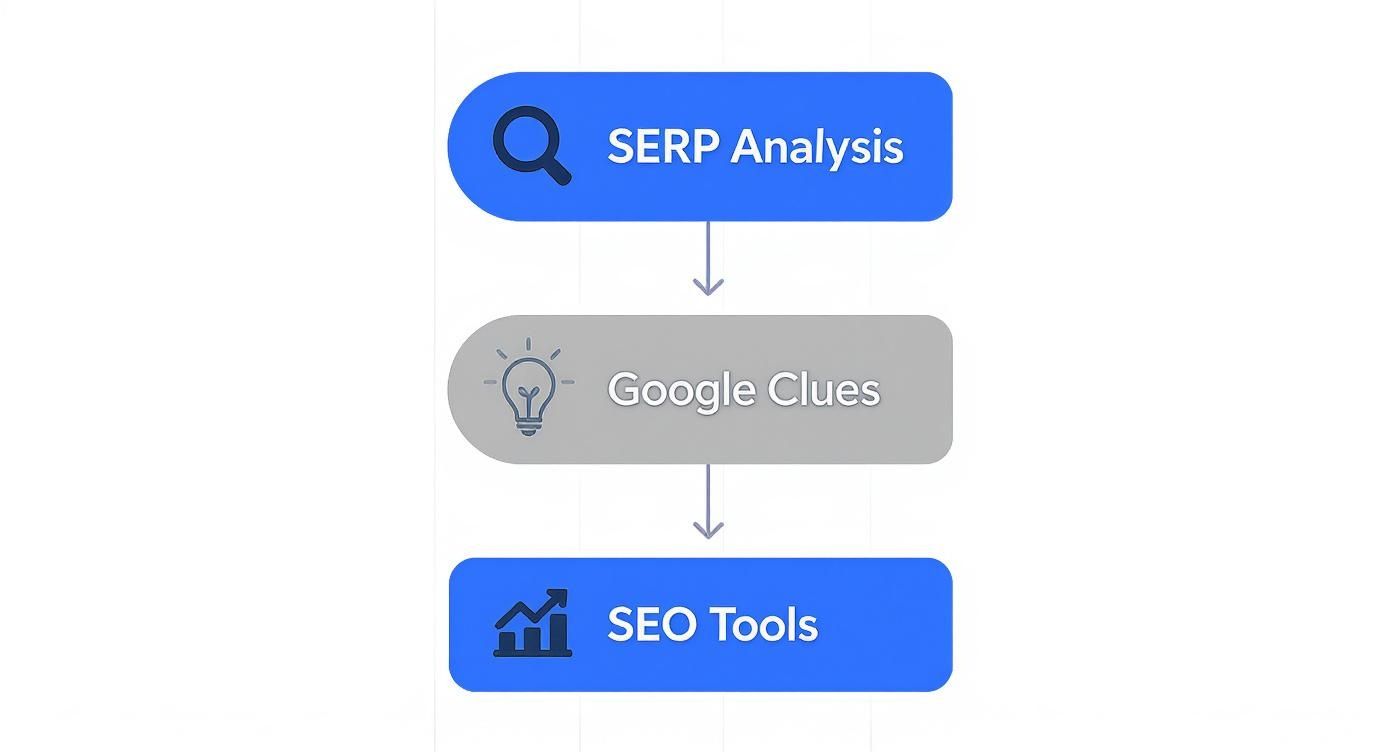
It all comes back to observing what's already working in the search results. Use that as your foundation, and then use other signals to refine your understanding of what a searcher really wants.
Content Format and Webflow Page Type by Search Intent
To make this crystal clear, I've put together a table that maps each search intent to the right content format and the specific page you should build in Webflow. This is your cheat sheet for building an intent-driven site architecture.
Use this table as your blueprint. Before creating any new page, identify the target keyword's intent and consult this guide to ensure you're building the right asset from the very beginning.
Building for Informational Intent in Webflow
When someone has a question, they want a clear, comprehensive answer. Your Webflow CMS is the perfect tool for this, letting you create structured, repeatable content like blog posts, guides, and tutorials that people love to read.
Actionable Webflow Tutorial:
- Set Up Your CMS Collection: Inside the Webflow Designer, navigate to the CMS tab and create a new Collection. Call it "Blog Posts," "Resources," or "Guides."
- Define Your Fields: Add the essential fields. A "Rich Text" field is a must for the main article content. Also add a "Plain Text" field for your meta description and an "Image" field for a featured image. For bigger guides, you could add custom fields for an author bio or estimated read time.
- Design the Template Page: Create the Collection Template Page. This is where you design the layout for all your future posts. Focus on readability: large fonts, short paragraphs, and lots of white space. Drag your CMS fields onto the canvas to pull in the content dynamically.
- Publish and Link: Once you publish a new article, make sure it’s easy for users and search engines to find. Add a "Collection List" element to your homepage or blog page to automatically display new posts. A strong internal linking strategy helps build topical authority.
This setup ensures every informational piece you create is optimized for SEO right out of the gate.
Optimizing for Transactional Intent
For transactional searches, speed and clarity are king. The user is ready to pull the trigger, so your job is to get out of their way. In Webflow, this translates to clean eCommerce product pages or dedicated service pages that make it incredibly easy to take action.
Actionable Webflow Tutorial:
Someone searches for "buy ergonomic office chair." They don't want a history of chairs; they want to see options, prices, and a big "Add to Cart" button.
- Page Type: Use a Webflow Ecommerce Product Page.
- Product Images: Use the default image fields to add high-quality product photos from multiple angles.
- Pricing & CTA: The "Add to Cart" component is crucial. Style this button to be prominent with a clear, action-oriented color.
- Details: Use a Rich Text field for the main description. To add detailed specs, go to your Product Collection settings and add Custom Fields for things like "Dimensions," "Material," or "Warranty."
- On-Page SEO: In the Page Settings for your Product Template Page, use dynamic fields to set your Title Tag. For example:
Buy the [Product Name] | [Your Brand Name]. This automatically optimizes every product page. - Content Format: You'll need a long-form blog post or a dedicated landing page that compares the top 3-5 CRM solutions head-to-head.
- Webflow Page Structure: You can build this using the Webflow CMS (create a "Comparisons" collection) or as a static page with a structured layout using grids or divs for each product.
- Comparison Table: A visually clear table is a must. Build a responsive grid in Webflow. In each grid cell, place a text block. For the content, you can either hard-code it on a static page or, for a more advanced setup, use multi-reference fields in your CMS to pull in product features dynamically.
- Honest Pros and Cons: Build credibility by offering a balanced view. It's okay to admit where a competitor shines, especially if you can show where your solution is superior for a specific user.
- Soft CTAs: Instead of a hard "Buy Now," use CTAs that match their investigative mindset, like "Learn More" or "See a Demo."
- Awareness (Top of Funnel): This is where it all begins. People have just realized they have a problem or a need. They’re using informational keywords to learn and explore. Your job here isn't to sell—it's to be the helpful expert.
- Consideration (Middle of Funnel): Okay, now they understand their problem and are actively looking for the best way to solve it. This is where commercial investigation intent comes in. They're comparing products, reading reviews, and weighing their options.
- Decision (Bottom of Funnel): They’ve done their research, made a choice, and are ready to pull the trigger. They’re using transactional keywords to find the right place to buy, sign up, or book a demo. Your goal is to make this final step as easy as possible.
- Awareness (Informational Pillar Page): You might write a huge, in-depth guide for the keyword "what is responsive web design." This pillar page answers every fundamental question someone might have, establishing you as an expert right away.
- Consideration (Commercial Cluster Page): Inside that guide, you can strategically link to a supporting article on the "best responsive Webflow templates." This page directly helps people who have moved past learning and are now actively looking for solutions.
- Decision (Transactional Service Page): Both the pillar and the cluster pages then point the user toward your main service page for "custom Webflow design services." This gives people who are ready to hire an expert a clear and logical next step.
- Bounce Rate: If people are leaving your page almost immediately, it’s a strong sign you didn't deliver on the promise of your title and meta description.
- Time on Page: Are people sticking around? Longer visit times usually mean your content is engaging and genuinely useful.
- Conversion Rate: This is the ultimate test for your commercial and transactional pages. Are people actually filling out that form, downloading that case study, or starting a trial?
For service businesses, the logic is identical. A search like "hire Webflow developer" needs to land on a services page with a sharp value proposition, portfolio examples, and a contact form or scheduler ready to capture that lead on the spot.
Capturing Commercial Investigation Traffic
These searchers are on the hunt, comparing their options. This is your chance to become their trusted advisor and guide them toward a decision. Your content needs to be genuinely helpful and comparative, not just a sales pitch.
Actionable Webflow Tutorial:
Let's say a B2B SaaS company wants to rank for "best CRM for small businesses." The SERP is dominated by comparison articles.
By meticulously mapping each intent type to a specific Webflow page structure, you take the guesswork out of your SEO. You start building a site that both Google and your users will absolutely love.
Building a Full-Funnel Strategy with Search Intent
Once you get a handle on search intent, a much bigger and more powerful idea starts to take shape. SEO isn't just about snagging the top spot for one big keyword. It’s about building a complete journey that walks someone from their first curious question all the way to a final decision.
By mapping different kinds of search intent to a marketing funnel, you can turn your Webflow site from a simple collection of pages into a well-oiled growth machine. Instead of chasing random keywords, you start building a system that actually nurtures people, making your site a genuinely effective sales and marketing tool.
Aligning Intent with the Marketing Funnel
The classic marketing funnel breaks down into three core stages: Awareness, Consideration, and Decision. The beauty of search intent is how neatly it lines up with this framework, giving you a clear roadmap for your content.
Here’s how they connect:
When you create content for each of these stages, you’re ready to meet a potential customer no matter where they are in their buying process. It's a strategy that builds trust and establishes your authority from the very first click.
Creating Content Clusters in Webflow
On your Webflow site, this full-funnel approach really comes to life with content clusters. Think of a content cluster as a group of interlinked pages that cover a single, broad topic from every angle. It's built around a central "pillar" page and supported by several "cluster" pages that dive into more specific, related keywords.
It’s a classic hub-and-spoke model. The pillar page is your central hub, and the cluster pages are the spokes, all linking back to the hub and to each other.
A well-structured content cluster does more than just organize your content; it signals to Google that you are an authority on a particular topic. This internal linking structure passes authority between pages, helping your entire cluster rank higher.
Let's imagine how this would work for a Webflow agency:
This structure creates a seamless journey, guiding a user from a simple question all the way to becoming a high-value lead. It’s how you transform a bunch of disconnected blog posts into a powerful system that captures business at every stage of the funnel.
Measuring and Refining Your Intent-Based SEO
So, you've created a piece of content perfectly aligned with search intent. That's a huge first step, but the real question is: how do you know it's actually working? Guesswork won't get you far. The proof is in how people behave once they land on your page.
It's tempting to get excited about vanity metrics like impressions, but they don't tell the whole story. We need to dig deeper into the data that truly reflects user satisfaction. These signals are the difference between a page that solves a problem and one that sends visitors scrambling for the "back" button.
Key Metrics to Monitor for Intent Matching
Think of your analytics as a direct line of communication with your audience. Specific behavioral signals can tell you exactly where your content is hitting the mark and where it's falling flat. A high bounce rate on an in-depth guide, for example, is a major red flag that you've misunderstood what the searcher was really looking for.
Here’s what you should be keeping a close eye on:
To get this right, you need a solid tracking setup. If you’re running specific campaigns, you need to know what's driving results. Understanding how to use tools like Google Analytics UTM variables is crucial for attributing success where it's due.
These metrics aren't just numbers on a dashboard. They’re clues. They're direct feedback from your users, telling you what's working and what desperately needs a rethink.
Auditing and Optimizing Existing Content
Your existing Webflow site is probably sitting on a goldmine of untapped potential. A content audit isn't about starting from scratch; it's about systematically reviewing what you already have to find pages that could be performing so much better. The goal is to spot that content with decent ranking potential that just needs a little nudge to fully align with user intent.
You're looking for the quick wins—pages you can adjust, re-optimize, and see a real impact from. For a complete walkthrough on how to do this, our guide on how to do an SEO audit lays out a clear, actionable framework. By combining user behavior data with a fresh look at the SERPs, you can fine-tune your pages, sharpen your CTAs, and build a content strategy that only gets stronger over time.
Common Questions About Search Intent
After digging into the fundamentals, a few specific questions always seem to come up. Let's tackle some of the most common ones so you can feel confident applying these ideas to your own Webflow site.
Is Search Intent Just Keyword Research?
That's a great question, and while they're deeply connected, they are two different things.
Think of it like this: keyword research tells you what people are typing into Google. Search intent analysis is the next step—it’s about figuring out why they're typing it.
For instance, traditional keyword research might tell you that "Webflow pricing" gets a lot of searches. But understanding the intent tells you that the person searching is probably close to making a decision. They have transactional intent, and they need to see your pricing page, not a blog post about the philosophy of pricing.
Can Search Intent Change Over Time?
Absolutely, and it happens more often than you'd think. The reason behind a search can shift because of new tech, a major news event, or just a gradual change in how people behave online. A keyword that was once purely informational can suddenly pick up commercial intent.
Take the query "remote work tools." For years, it was mostly informational—people were just curious. But when the world suddenly shifted to working from home, that query took on massive commercial and transactional intent almost overnight. Millions of people needed solutions, and they needed them now. This is why you can't just set and forget your keywords; you have to keep an eye on the SERPs.
The best SEO strategies are never static. You have to keep monitoring the search results for your most important keywords. This is how you'll spot shifts in user intent and be able to adjust your Webflow content before your competitors even notice something's changed. It’s all about staying relevant.
What About Keywords with Mixed Intent?
You'll run into these all the time. These are the queries where the SERP is a mix of everything—blog posts, product pages, videos, you name it. For your Webflow site, don't see this as a problem. See it as an opportunity.
When you find a mixed-intent keyword like "best email marketing software," the winning strategy is to create a piece of content that satisfies multiple needs at once. A comprehensive guide that both explains the basics (informational) and directly compares the top options (commercial) is perfect. Structure it with clear headings and maybe even a table of contents, so visitors can jump straight to the section that matches their personal goal.
Ready to turn your Webflow site into a revenue engine that consistently attracts the right audience? At Block Studio, we build and execute unified growth strategies—combining expert Webflow development with data-driven SEO and content production to deliver compounding results. Learn more about how we can help you grow.